

This post may contain affiliate links. If you buy through them, we may earn a small commission at no extra cost to you.
A dead phone battery on a winter trail is more than an annoyance. Your phone is probably your map, your camera, your flashlight backup and your way to call for help, and cold weather drains it far faster than you expect. A phone that shows 60 percent at the trailhead can shut off without warning an hour later on a windy ridge. The good news is that cold does not destroy the battery, it only slows it down, and a few simple habits keep it working all day and all night. If you are new to winter trips, our cold weather backpacking guide covers the rest of your kit.
This guide explains why batteries struggle in the cold, then walks through how to carry your phone, how to set it up before you leave, how to sleep with it, how to charge it safely, and what backup navigation to bring so a dead screen never leaves you stuck.
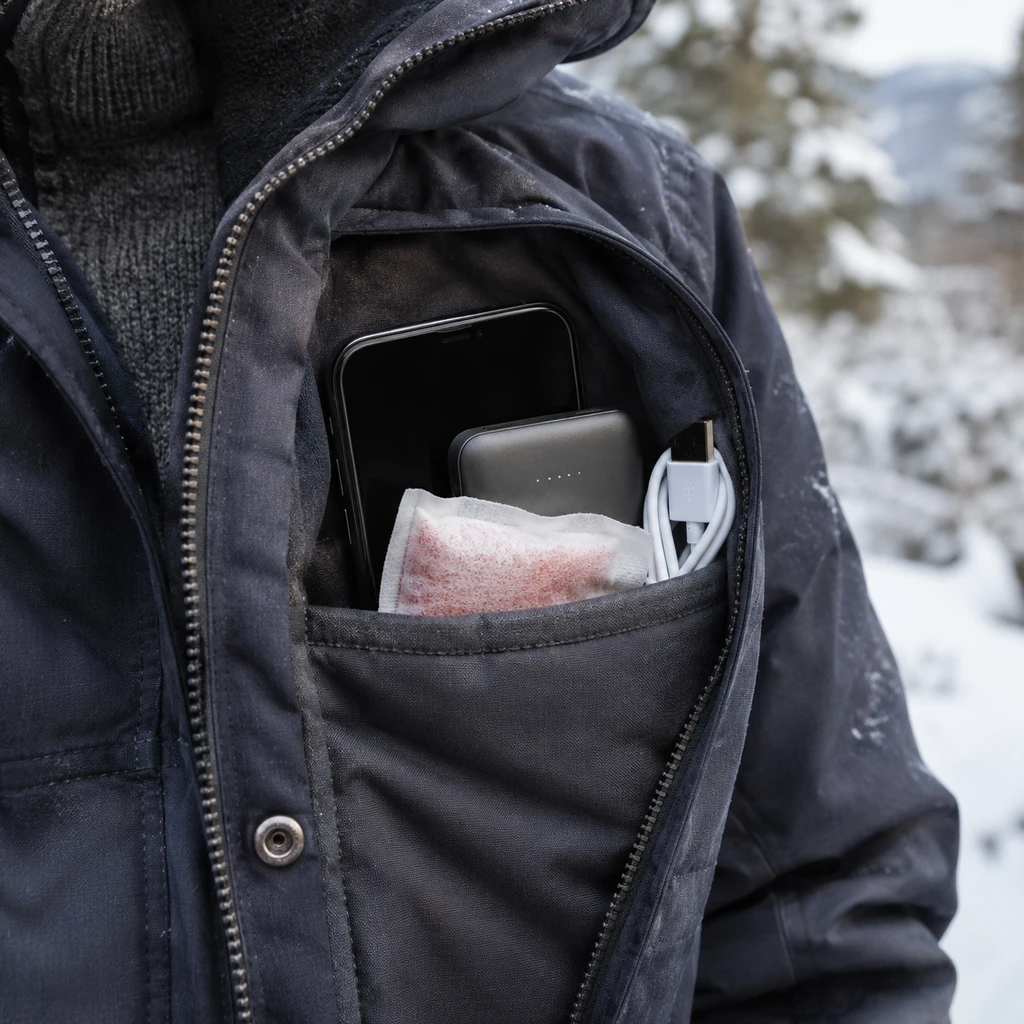
Table of Contents
Why Cold Weather Drains Your Phone Battery
Phones use lithium ion batteries, which make electricity through a chemical reaction. Cold slows that reaction down. The battery still holds its charge, but it cannot deliver power as quickly, so the voltage sags under load and the phone reads that drop as a low battery. When the voltage falls far enough, the phone simply shuts itself off to protect the battery, even if the percentage looked healthy a minute earlier.
The Loss Is Usually Temporary
The capacity you lose in the cold mostly comes back when the battery warms up. That is why a phone that died on the summit often turns back on with a decent charge once it sits in your jacket for half an hour. The charge was there the whole time; the battery just could not deliver it while it was cold.
Know the Operating Range
Apple lists an ideal operating range of 32 to 95F for iPhones, and most Android makers publish similar numbers. Below freezing, expect the battery percentage to drop faster than normal and shutdowns to become more likely, especially when the battery is already low or old.
Older Batteries Suffer Most
A battery that has been through a few years of charge cycles has less capacity and higher internal resistance, so the cold hits it harder. If your phone already struggles to last a day at home, consider replacing the battery before a winter trip.
How to Carry Your Phone in Winter
Where your phone rides matters more than any setting. The goal is simple: keep it as close to your body heat as possible.
Use an Inside Pocket
Keep your phone in an inside chest pocket of your midlayer or jacket, not in a hip belt pocket, a pack lid or an outer shell pocket. Your core stays warm all day, and a phone resting against it stays well above freezing. Our guide on how to layer for hiking shows which layers usually have the best pockets.
Pair It With a Hand Warmer
On very cold days, slip a warmer into the same pocket, but keep a layer of fabric between them so the phone never gets hot. A rechargeable warmer like the Hotdot rechargeable hand warmers or the OCOOPA Duoheat gives gentle, steady heat. Our list of the best rechargeable hand warmers compares more options.
Take It Out Only When Needed
Every minute your phone spends in your hand on a windy ridge cools the battery. Decide what you want to do before you pull it out, take the photo or check the map, and put it straight back. Gloves with touchscreen fingertips help you work fast.
Set Up Your Phone Before the Trip
Small changes to your settings, made at home, can roughly double how long a single charge lasts on the trail.
Download Offline Maps
Searching for a cell signal in the backcountry is one of the biggest drains on your battery. Download your route and offline maps before you leave the house, then you can navigate in airplane mode all day. Our trip planning guide explains what else to prepare ahead of time.
Use Airplane and Low Power Mode
Airplane mode stops the phone from hunting for towers, and GPS still works without a signal. Low Power Mode on iPhone or Battery Saver on Android trims background activity even further. Turn both on at the trailhead and only switch the radios back on when you need to send a message.
Turn Off Background Refresh
Apps quietly refresh email, photos and social feeds in the background. Turn off background app refresh, automatic downloads and push email for the trip, and close navigation apps you are not actively using.
Lower the Brightness
The screen is the single most power hungry part of the phone. Set brightness low, shorten the auto lock time to 30 seconds and use dark mode if your phone has an OLED screen. These small changes add up to hours on a long day.
Keeping Your Phone Battery Warm Overnight
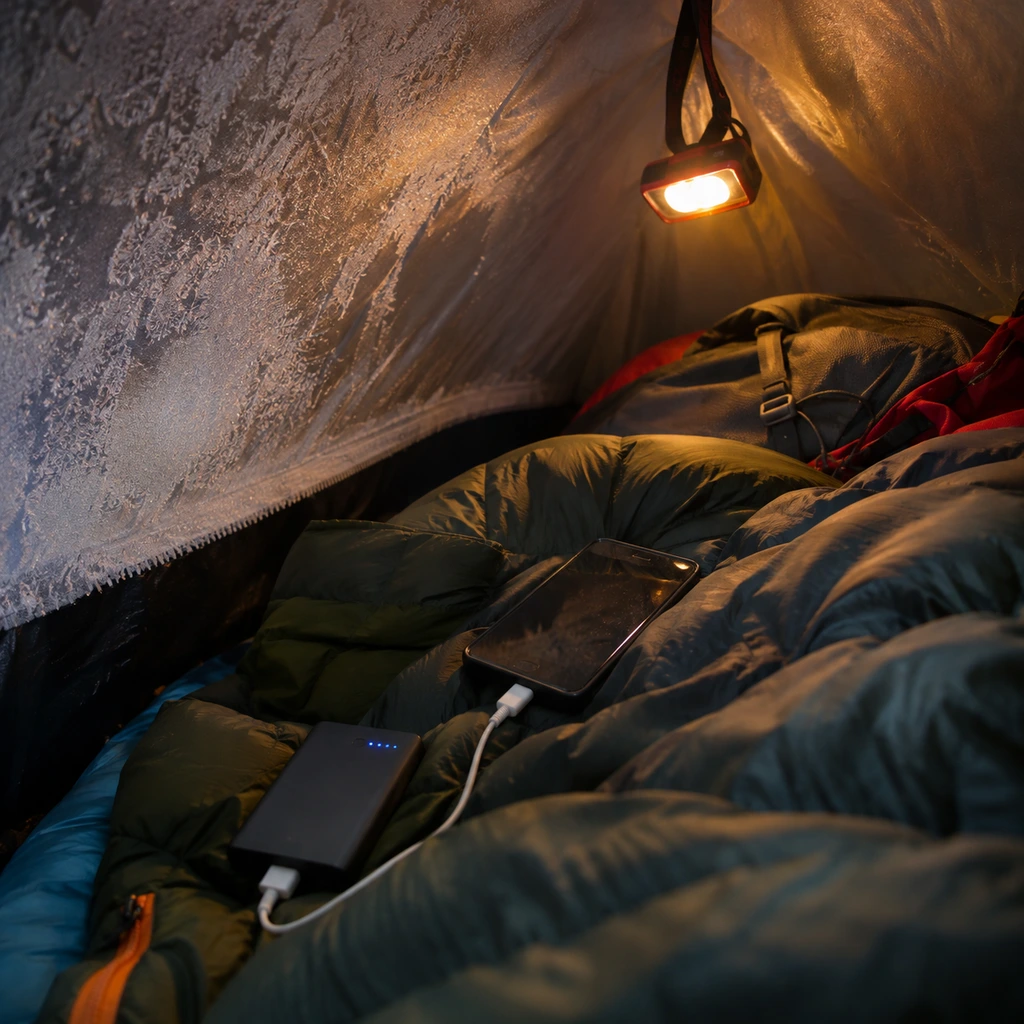
Nights are the hardest test, because temperatures drop for hours while you sleep. A phone left in a tent pocket or a pack can be frozen and flat by morning.
Sleep With Your Phone and Power Bank
Put your phone, your power bank and any spare batteries inside your sleeping bag with you, in a small stuff sack near your chest or at your feet. They stay warm from your body heat all night. The same trick keeps your water filter from freezing, as our guide on how to keep water from freezing while hiking explains. A warm bag makes this easier, so see our tips on how to stay warm in a sleeping bag.
Use Your Pillow as a Pocket
If you would rather not have hard objects in the bag, tuck the phone under your pillow, inside a fleece or a soft pillow cover. An inflatable pillow with a removable cover, such as the TREKOLOGY Aluft Plus SE, gives you a warm spot right next to your head. Ultralight hikers can do the same with the tiny Gear Doctors 3.5oz pillow and a buff pulled over it.
How to Charge Safely in the Cold
Charging is where cold can do real damage, so treat it carefully.
Warm the Phone Before Charging
Do not charge a frozen battery. Charging a lithium ion battery below freezing can cause permanent damage, because the lithium cannot move into the electrode properly. Warm the phone inside your jacket or sleeping bag for 20 to 30 minutes before plugging it in.
Carry a Power Bank and a Short Cable
A small power bank is the best insurance for a multi day trip. Keep it as warm as the phone, since it uses the same battery chemistry, and bring a short cable so you can charge the phone while both stay inside your pocket or sleeping bag. Pack the cable somewhere easy to reach, as our guide on how to pack a backpacking pack suggests.
Top Up Early and Often
Charge when the phone is around 50 percent, not when it is nearly empty. A cold battery at 20 percent can shut off suddenly, while one kept in the middle of its range handles the cold far better.
Backup Navigation and Safety
Even with every trick, electronics can fail in the cold. Never let your phone be your only lifeline in winter.
- Carry a paper map and compass and know how to use them.
- Bring a satellite messenger for emergencies; our guide to using satellite messengers explains the options.
- Pack a headlamp with fresh batteries rather than relying on the phone flashlight; see our list of the best headlamps for camping.
- Check the forecast before you leave with the apps in our trail weather guide.
- Tell someone your route and when you expect to be back.
Short winter days also mean more hiking in the dark. Our night hiking guide and our tips for hiking in snow and ice will help you plan for both. If you are just starting out, our backpacking for beginners guide covers the basics.
Frequently Asked Questions
Does cold weather permanently damage a phone battery?
Normal use in the cold does not cause permanent damage, and most lost capacity returns when the battery warms up. Charging a frozen battery or leaving a phone in extreme cold for long periods can cause lasting harm.
Why does my phone shut off at 30 percent in the cold?
The cold battery cannot deliver enough voltage under load, so the phone shuts down to protect itself. Warm it in an inside pocket and it will usually turn back on with charge remaining.
Will taking photos in the cold drain my battery?
Yes, the camera and screen draw a lot of power. Keep shots quick and return the phone to a warm pocket. For long exposure night photos, our guide on how to photograph the night sky has tips for working in the cold.
What is the best way to protect a phone battery on a winter backpacking trip?
Keep the phone in an inside pocket by day and in your sleeping bag at night, run it in airplane mode with offline maps, warm it before charging, and carry a power bank plus a map and compass as backup.
Discover more from Maive Verse
Subscribe to get the latest posts sent to your email.